GST Item Master Wireframes
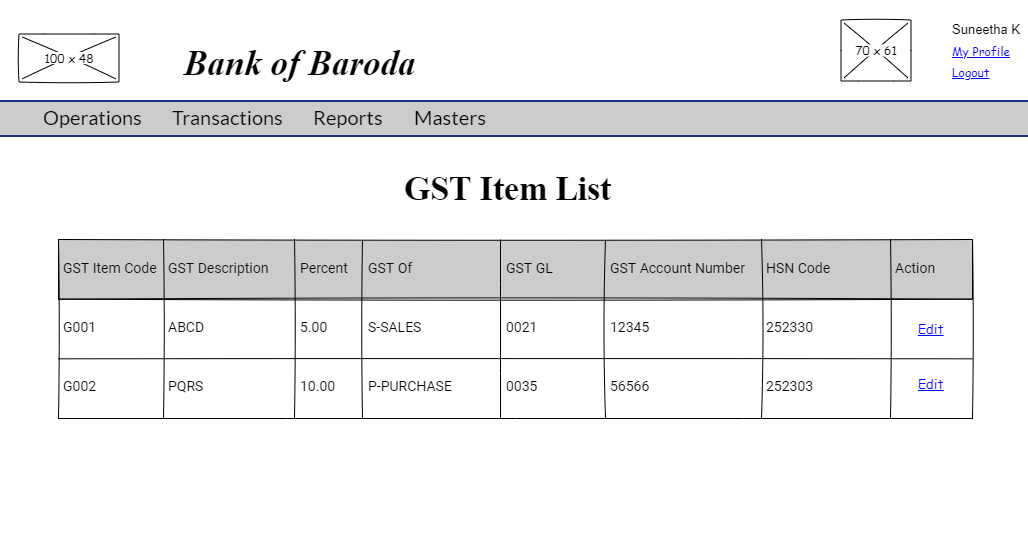
GST Item List
User story reference: U2503
The 'GST Item' link from the Masters view screen takes one to the list of GST Item details.
GST Item Edit
User story reference: U2502
By clicking the Edit link in the GST Item List page you are directed to GST Item edit page. Enter the modified GST Item details.

By clicking the "Save" button, modified GST Item details are saved. You are redirected to GST item list page with newly created GST items visible in the list.
GST Item Create
User story reference: U2501
Note that there is a create link on the GST Item list page.By clicking that, you are directed to the GST Item create page. Write the new GST Item details. Here is the UI to enter new GST Item details.

NOTE : 1) Based on "GST Of" field selection (either "Sales" or "Purchase"), the "GST Item Code" field entered should be validated for data duplicacy (uniqueness).
NOTE : 2) HSN Code should accept only digits 0-9 but datatype should be varchar.
By clicking the "Save" button, a new GST Item is created. You are redirected to GST item list page with updated GST items.